
How to remove your custom domain
If you set up a custom domain and want to revert back to the original Clients on Automation Software subdomain you signed up with, you can accomplish this in a few steps.
Preparatory Step: Make sure the A record in your DNS settings is pointing to the Clients on Automation Software servers. Similar to below. For more information on DNS settings, click here.

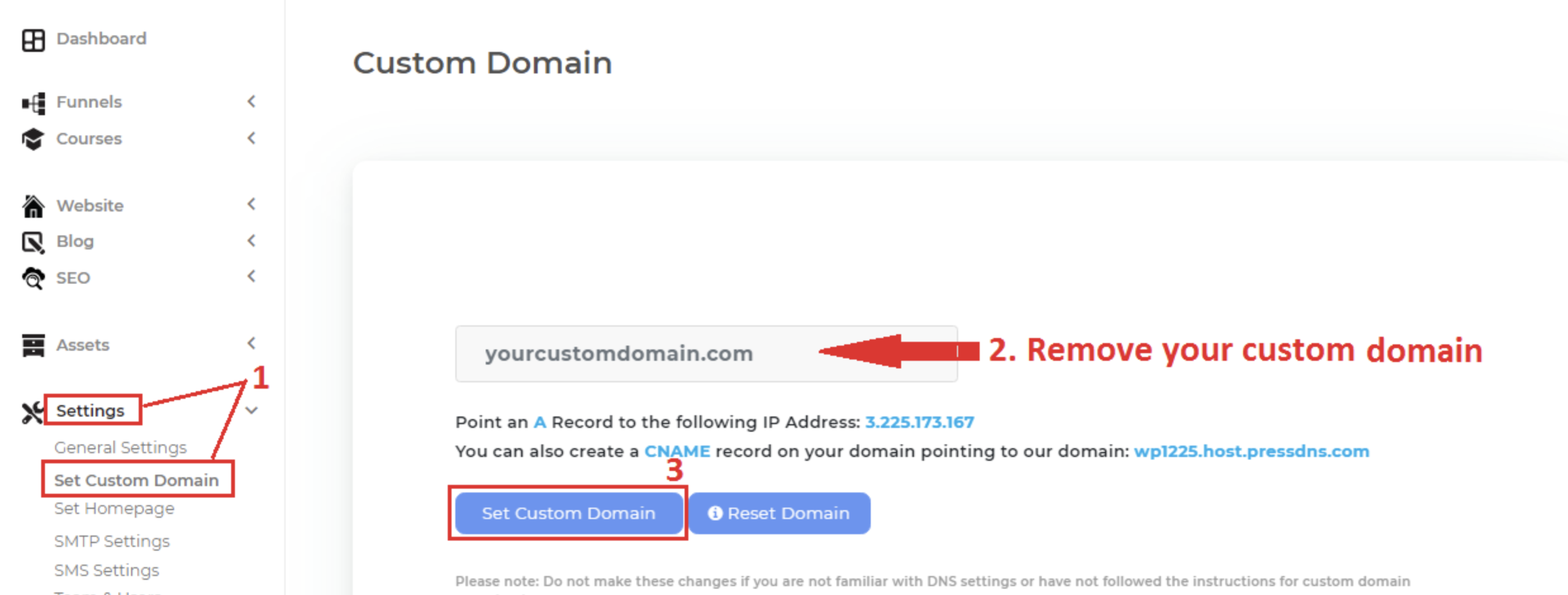
Step 1: Navigate to Settings > Set Custom Domain
Step 2: Remove your custom domain from the input box
Step 3: Click the "Set Custom Domain" button.
Your site will now revert back to the subdomain you used when you first signed up with Clients on Automation Software.
To login to your Clients on Automation Software back office, you will use your subdomain:
LOGIN: yoursubdomain.dropfunnels.com/login
